
Template — Webhook API Gateway
This template shows how to build a complete REST API gateway in Floogos using two nodes: Webhook Router (splits traffic by verb) and Webhook Filter (validates each branch). The result behaves like a real HTTP API endpoint supporting GET, POST, PUT and DELETE.
What You Will Build
Section titled “What You Will Build”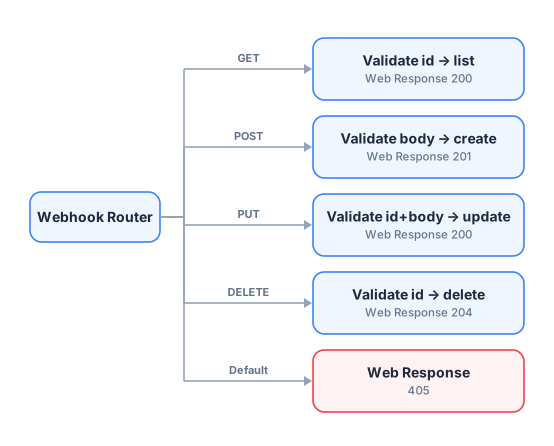
Each branch is independent. Adding a new verb is as simple as connecting one more handle.
Step 1 — Webhook Trigger
Section titled “Step 1 — Webhook Trigger”Drag a Webhook node to the canvas. This is your single API entry point — one URL handles all methods.
No special configuration needed. The webhook automatically captures the HTTP method and passes it as data._request.method.
Step 2 — Webhook Router
Section titled “Step 2 — Webhook Router”Drag a Webhook Router node and connect it to the Webhook output.
This node has no configuration — just wire the output handles:
| Handle | Wire to |
|---|---|
| GET | Next Webhook Filter for GET |
| POST | Next Webhook Filter for POST |
| PUT | Next Webhook Filter for PUT |
| DELETE | Next Webhook Filter for DELETE |
| Default | Web Response (405) |
Step 3 — Webhook Filter per branch
Section titled “Step 3 — Webhook Filter per branch”Add one Webhook Filter per branch to validate the payload before business logic runs.
GET branch — validate query parameter
Section titled “GET branch — validate query parameter”{ "allowGET": true, "requiredFields": [], "errorCode": "400", "errorBody": {}}GET requests often have no required body fields. Leave requiredFields empty if query parameters are optional.
POST branch — validate required body fields
Section titled “POST branch — validate required body fields”{ "allowPOST": true, "requiredFields": ["name", "email"], "errorCode": "422", "errorBody": { "success": false, "message": "Missing required fields: name and email are required." }}PUT branch — validate id and body
Section titled “PUT branch — validate id and body”{ "allowPUT": true, "requiredFields": ["id", "name"], "errorCode": "422", "errorBody": { "success": false, "message": "Missing required fields: id and name are required for update." }}DELETE branch — validate id
Section titled “DELETE branch — validate id”{ "allowDELETE": true, "requiredFields": ["id"], "errorCode": "400", "errorBody": { "success": false, "message": "Field 'id' is required for deletion." }}:::note One method per filter Each Webhook Filter should only have one method enabled (the one that corresponds to its branch). The Router already ensures only the right method arrives on each branch, but having a single method enabled makes the intent explicit. :::
Step 4 — Business Logic Nodes
Section titled “Step 4 — Business Logic Nodes”After each Webhook Filter, add the nodes that perform the actual work.
GET branch example — query a database:
Webhook Filter → SQL Query (SELECT * WHERE id = {{data.id}}) → Web Response 200POST branch example — insert a record:
Webhook Filter → EditFields (format data) → SQL Query (INSERT) → Web Response 201PUT branch example — update a record:
Webhook Filter → SQL Query (UPDATE WHERE id = {{data.id}}) → Web Response 200DELETE branch example — delete a record:
Webhook Filter → SQL Query (DELETE WHERE id = {{data.id}}) → Web Response 204Step 5 — Web Response nodes
Section titled “Step 5 — Web Response nodes”Add a Web Response at the end of each branch with the appropriate HTTP code.
| Branch | HTTP Code | Typical body |
|---|---|---|
| GET (found) | 200 | Result data |
| GET (not found) | 404 | { "error": "Not found" } |
| POST (created) | 201 | Created record |
| PUT (updated) | 200 | Updated record |
| DELETE (deleted) | 204 | (empty body) |
| Default (wrong method) | 405 | { "error": "Method Not Allowed" } |
Web Response 405 configuration (Default branch):
{ "code_response": 405, "body_response": { "error": true, "message": "Method not allowed. Supported methods: GET, POST, PUT, DELETE." }, "headers": { "Allow": "GET, POST, PUT, DELETE" }}Nodes Used
Section titled “Nodes Used”| Node | Count | Purpose |
|---|---|---|
| Webhook | 1 | Single API entry point |
| Webhook Router | 1 | Split traffic by HTTP method |
| Webhook Filter | 4 | Validate payload per branch |
| [Business logic nodes] | 4+ | SQL Query, HTTP, DataStore, etc. |
| Web Response | 5+ | Return HTTP responses |
Testing the API
Section titled “Testing the API”Use Postman, curl, or any HTTP client to test each branch:
# GET — list itemscurl -X GET https://your-webhook-url
# POST — create itemcurl -X POST https://your-webhook-url \  -H "Content-Type: application/json" \  -d '{"name": "Alice", "email": "alice@example.com"}'
# PUT — update itemcurl -X PUT https://your-webhook-url \  -H "Content-Type: application/json" \  -d '{"id": 42, "name": "Alice Updated"}'
# DELETE — delete itemcurl -X DELETE https://your-webhook-url \  -H "Content-Type: application/json" \  -d '{"id": 42}'
# PATCH — should return 405curl -X PATCH https://your-webhook-url
Expected behavior:
| Request | Expected response |
|---|---|
| GET | 200 + data |
| POST with name+email | 201 + created record |
| POST without email | 422 + error message |
| PUT with id+name | 200 + updated record |
| DELETE with id | 204 |
| PATCH | 405 Method Not Allowed |
Variations
Section titled “Variations”Variation A — Single Filter instead of Router (simpler API)
Section titled “Variation A — Single Filter instead of Router (simpler API)”If you only accept POST:
Webhook → Webhook Filter (allowPOST, requiredFields) → Business Logic → Web ResponseUse Webhook Router only when you need to handle multiple methods on the same endpoint.
Variation B — Authentication layer
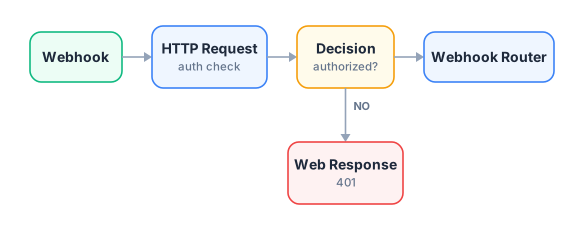
Section titled “Variation B — Authentication layer”Add an HTTP Request node before the Router to call an auth service:
Variation C — Rate limiting with DataStore
Section titled “Variation C — Rate limiting with DataStore”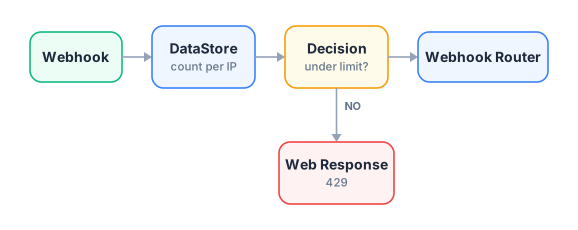
Related Nodes
Section titled “Related Nodes”- Webhook — entry point
- Webhook Filter — payload validation
- Webhook Router — method-based routing
- Web Response — HTTP responses
- Switch — condition-based routing on data fields