AI agent fundamentals: brain, tools, RAG and skills
An AI agent is not just “a chatbot that replies”: it is a system that reasons, decides and acts. It can consult your documentation, run real actions (create an order, send an email, query a database) and chain several steps until it resolves what you asked.
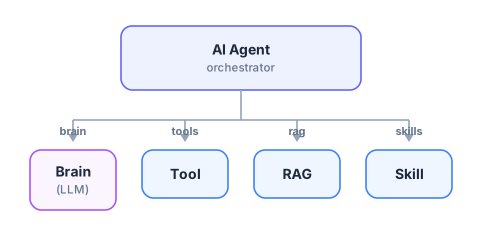
In Floogos an agent is built by connecting four pieces around an orchestrator. Understanding what each one does is what lets you go from a basic chatbot to an assistant that actually gets work done. These are the fundamentals.
The brain is the language model (LLM) that thinks: it interprets the user’s message, decides what to do and writes the answer. It is the agent’s reasoning engine.
What you choose here: the provider (OpenAI, Claude, Gemini, Mistral, Groq, a local LLM…) and the specific model.
Key rule:one brain per agent. It’s the one that “thinks”; the rest of the pieces give it senses and hands.
Analogy: it’s a person’s brain. Without it there is no agent; with it but without the other pieces, it’s someone very smart locked in a room with no information and no tools.
A tool is a capability the agent can execute when it needs to. The brain decides when to use it; Floogos actually runs it and returns the result.
What you can connect: any of Floogos’ 600+ nodes (send an email, call an API, write to a database), a whole workflow, or a registered tool.
You can connect several. The agent picks the right one for the request (this is called function calling).
Analogy: they’re the hands. They turn “I know I should do X” into “I do X”. Without tools the agent can only talk; with tools it can operate your systems.
RAG (Retrieval-Augmented Generation) gives the agent its own knowledge base. Instead of relying only on what the LLM “knows out of the box”, the agent retrieves the most relevant fragments of your documents and answers with them.
How it works: first you index your documents (manuals, catalogs, policies, tickets) and they are stored as vectors; when asked, the agent retrieves the chunks most similar to the query and uses them as context.
What it’s for: answering about your own, current and specific information — without making things up and without retraining any model.
Analogy: it’s the agent’s library. Before answering, it checks the right book on the right page.
A skill is a package of instructions + tools that the agent activates only when the request is relevant to its description. Instead of stuffing every rule into one giant prompt, you encapsulate each specialty in its own skill.
How it works: each skill has a description (“returns management”, “billing questions”). The agent activates only the ones that apply to the user’s message.
What it’s for: keeping the agent focused and cheap — it doesn’t carry irrelevant instructions on every answer — and scaling its behavior by adding skills, not rewriting the prompt.
Analogy: they’re professional specialties. The same person “puts on the hat” of support, sales or billing depending on what they’re asked.