
Webhook Filter
Place this node immediately after a Webhook or FormTrigger to act as a security and validation gate before the rest of the flow runs.
Description
Section titled “Description”Webhook Filter checks two things in sequence:
- HTTP Method — Is the request method among the ones you allowed?
- Required Fields — Does the payload contain every field you declared as mandatory?
If either check fails, the flow stops and the caller receives the HTTP error code and body you configured. If both pass, data continues unchanged to the next node.
Configuration
Section titled “Configuration”| Field | Type | Required | Description |
|---|---|---|---|
| Allow GET | Boolean | No | Accept GET requests. Default: false |
| Allow POST | Boolean | No | Accept POST requests. Default: true |
| Allow PUT | Boolean | No | Accept PUT requests. Default: false |
| Allow DELETE | Boolean | No | Accept DELETE requests. Default: false |
| Allow PATCH | Boolean | No | Accept PATCH requests. Default: false |
| Allow OPTIONS | Boolean | No | Accept OPTIONS requests. Default: false |
| Required Payload Fields | JSON | No | Array of field paths that must exist in the payload. Supports dot notation. Example: ["email", "user.name"] |
| HTTP Error Code | Select | No | Code returned when validation fails: 400, 401, 403, 404, 405, 422, 429 or 500. Default: 400 |
| Error Response Body | JSON | No | Custom JSON sent as the error body. If empty, an automatic message is generated. |
:::tip Method defaults If no method is enabled, the filter lets all methods pass. This allows you to use the node purely for field validation without restricting verbs. :::
How It Works
Section titled “How It Works”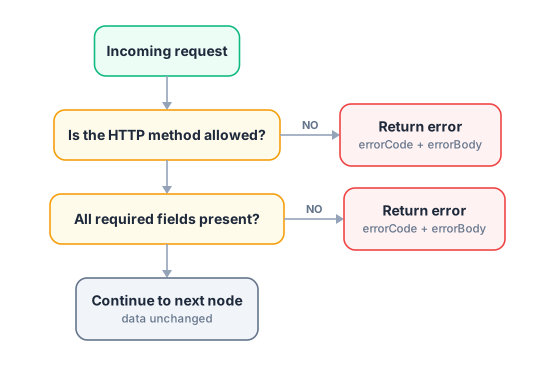
Error Response Format
Section titled “Error Response Format”When a check fails, the flow terminates and returns an HTTP response directly to the caller:
HTTP 400 Bad Request
{  "error": true,  "message": "Required field 'email' is missing or empty"}
If you configure a custom Error Response Body, your JSON replaces the automatic message entirely.
Usage Examples
Section titled “Usage Examples”Example 1 — Accept only POST with required fields
Section titled “Example 1 — Accept only POST with required fields”{ "label": "Webhook Filter", "allowPOST": true, "requiredFields": ["email", "order.id", "order.total"], "errorCode": "422", "errorBody": { "success": false, "message": "Invalid request. Required fields are missing." }}Behavior:
- A
GETrequest → immediately returns HTTP 422 - A
POSTwithoutemail→ returns HTTP 422 with the custom body - A
POSTwith all fields → continues to the next node
Example 2 — Field validation only (no method restriction)
Section titled “Example 2 — Field validation only (no method restriction)”{ "label": "Webhook Filter", "requiredFields": ["token", "payload"], "errorCode": "401", "errorBody": { "error": "Unauthorized" }}Since no methods are enabled, all HTTP verbs are allowed and only the field presence is checked.
Example 3 — REST API gateway (GET + POST)
Section titled “Example 3 — REST API gateway (GET + POST)”{ "label": "Webhook Filter", "allowGET": true, "allowPOST": true, "errorCode": "405", "errorBody": { "error": "Method Not Allowed" }}Dot Notation for Nested Fields
Section titled “Dot Notation for Nested Fields”The requiredFields array supports nested paths using dot notation:
| Path | Checks for |
|---|---|
"email" | payload.email |
"user.name" | payload.user.name |
"order.items.0" | First item of payload.order.items |
A field is considered missing if its value is undefined, null, or an empty string "".
- The node reads the HTTP method from
data._request.method, which is set automatically by the Webhook and FormTrigger nodes. - When validation fails, the flow is terminated with
_stopflowprocess: true— downstream nodes do not execute. - The default automatic error body includes
{ "error": true, "message": "..." }with a human-readable explanation. - Error Code and Error Body apply to both failure types (method mismatch and missing field).
- Data is never modified — if the filter passes, data flows exactly as received.
Related Nodes
Section titled “Related Nodes”- Webhook — the trigger that sets
_request.method - FormTrigger — another trigger compatible with this filter
- Web Response — to return custom HTTP responses further down the flow
- Webhook Router — to route traffic by HTTP method instead of blocking it