
Webhook Router
Place this node immediately after a Webhook or FormTrigger to split traffic by HTTP method — each verb has its own output handle so you can wire independent processing paths.
Description
Section titled “Description”Webhook Router reads data._request.method from the incoming request and forwards execution to the output handle that matches the verb (route_GET, route_POST, etc.). If no handle is connected for the method received, the request flows to the Default output.
No configuration fields are needed. Routing is purely connection-based: you wire each output handle to the node you want.
Output Handles
Section titled “Output Handles”| Handle | Label | Color | Description |
|---|---|---|---|
route_GET | GET | Blue | Requests with method GET |
route_POST | POST | Green | Requests with method POST |
route_PUT | PUT | Orange | Requests with method PUT |
route_DELETE | DELETE | Red | Requests with method DELETE |
route_PATCH | PATCH | Purple | Requests with method PATCH |
route_OPTIONS | OPTIONS | Cyan | Requests with method OPTIONS |
route_default | Default | Grey | Any method with no connected handle |
:::tip Partial wiring
You only need to connect the handles you actually use. A GET request with route_GET unconnected goes straight to Default.
:::
How It Works
Section titled “How It Works”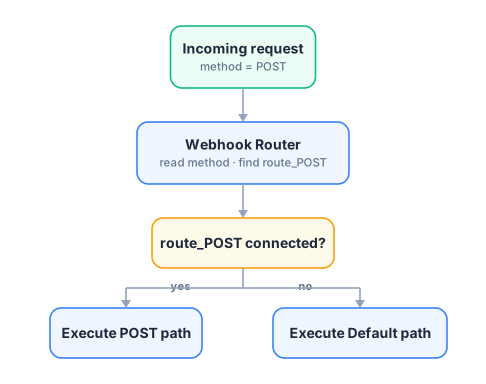
Usage Examples
Section titled “Usage Examples”Example 1 — Full REST API router
Section titled “Example 1 — Full REST API router”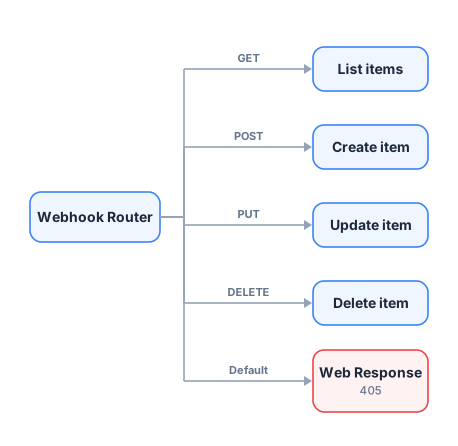
Connect a Web Response node to the Default output returning HTTP 405 to reject unexpected methods automatically.
Example 2 — Read vs Write split
Section titled “Example 2 — Read vs Write split”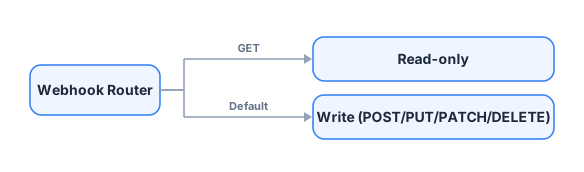
Wire only route_GET and let everything else fall to Default.
Example 3 — Combine with Webhook Filter
Section titled “Example 3 — Combine with Webhook Filter”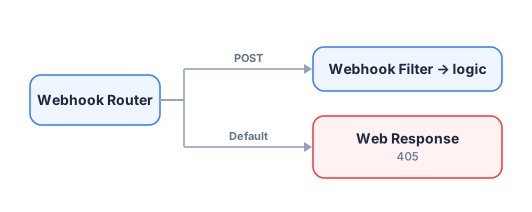
Use the Router to direct methods, then the Filter to validate fields on the specific branch.
Configuration
Section titled “Configuration”This node has no configuration fields. The only editable value is the node label.
The routing is defined entirely by which handles you connect in the canvas:
- Connect
route_GET→ requests with GET go there - Leave
route_PUTunconnected → PUT requests go to Default - Always wire Default to handle unexpected methods gracefully
- The method comparison is case-insensitive and always normalised to uppercase internally (
get→GET). - Data passes through without modification — the Router only decides which path to follow.
- If
data._request.methodis absent (e.g. the node is not preceded by a Webhook), the method is treated as empty and the request goes to Default. - Unlike Webhook Filter, this node never stops the flow — every request reaches some downstream node.
Related Nodes
Section titled “Related Nodes”- Webhook — sets
_request.methodused by this router - FormTrigger — another compatible trigger
- Webhook Filter — to validate fields after routing
- Web Response — to return HTTP responses at the end of each branch
- Switch — condition-based routing on any data field