
Forms - Prefilled data and public URL
This document is the operational guide for Floogos public forms, complementing Forms - Data capture. It focuses on two aspects:
- How the URL that the end user visits is built.
- How prefilled data is loaded from a workflow.
If you only want to understand what forms are and the FormTrigger / FormRender nodes, start with the general document. If you already know them and want the details about URLs, hashes, temporary sessions and real-world cases, read on.
Anatomy of the public URL
Section titled “Anatomy of the public URL”When you publish a form, Floogos generates a URL like:
https://app.floogos.com/f/{public_hash}The pieces are:
| Piece | Description |
|---|---|
app.floogos.com | Front-end domain (the backend’s APP_HOST env variable; in development it is http://localhost:5173) |
/f/ | Fixed prefix for public form routes |
{public_hash} | 32-character random hex token (16 bytes) generated when the form is marked as public |
How the public_hash is generated
Section titled “How the public_hash is generated”When you create or publish a form:
public_hash = crypto.randomBytes(16).toString('hex');// Example: "a1b2c3d4e5f67890fedcba0987654321"This hash:
- Is unique per form.
- Is stored in
forms.public_hash. - Is not regenerated when you edit the form (the URL is stable).
- Is set to NULL if you turn off the
is_publicflag, immediately invalidating the URL. - If you publish it again, a new one is generated — the previous URL becomes dead.
States validating that the URL is servable
Section titled “States validating that the URL is servable”The backend (in GET /f/:hash) requires the form to satisfy:
SELECT id FROM formsWHERE public_hash = ? AND is_public = TRUE AND status = 'published'If any of these conditions fails, the user sees a static HTML “Form not found” page. This means:
- If the form is in
draft, it is not served even if the hash is correct. - If you remove the
is_publicflag, the URL stops working but the form still exists in your account. - If you rotate the hash (republish), old URLs become invalid.
URL with prefilled data
Section titled “URL with prefilled data”When a workflow uses the FormRender node, the URL includes an additional parameter:
https://app.floogos.com/f/{public_hash}?prefill={session_hash}| Piece | Description |
|---|---|
?prefill= | Query string parameter that activates prefill mode |
{session_hash} | 32-character random hex token pointing to a temporary session with the prefilled values |
Without the prefill parameter, the form is served empty (as any anonymous visitor would see it). With prefill, the form is loaded with the values associated with that temporary session.
How the session_hash is generated
Section titled “How the session_hash is generated”The FormRender node, on execution:
- Generates a unique session hash:
crypto.randomBytes(16).toString('hex'). - Processes the
field_mappingresolving all dynamic variables ({{@Webhook.email}},{{var.foo}}, etc.) with the workflow data at that moment. - Inserts a row into the
form_prefill_sessionstable with:session_hash(the key)form_idprefill_data(JSON with the resolved values)custom_title,custom_description(optional)redirect_after_submit(optional)workflow_data(full snapshot of the workflow state for auditing)expires_at = NOW() + 24h
- Returns the constructed URL:
${APP_HOST}/f/${form.public_hash}?prefill=${sessionHash}.
Important things to understand:
- Each execution of
FormRendergenerates a new session_hash. If the workflow runs 100 times, there are 100 independent prefill sessions. - The session expires after 24 hours. After that, the URL still loads the form but without the prefilled values (as if it were a normal visitor).
- The session is not deleted on form submit: it expires by time. This allows, for example, the same link to prefill multiple times if the user refreshes within 24h.
How the data is loaded on the client
Section titled “How the data is loaded on the client”When the browser opens /f/{public_hash}?prefill={session_hash}:
-
The backend serves the static HTML page
form-render.html. -
The front-end JS calls
GET /f/{public_hash}/data?prefill={session_hash}. -
The backend validates in a single query:
SELECT * FROM form_prefill_sessionsWHERE session_hash = ?AND form_id = ?AND expires_at > NOW() -
If the session exists and has not expired:
prefill_datais parsed (with a robust fallback for cases where MySQL returns the JSON serialized in indexed format).- If the session has
custom_titleorcustom_description, they override the base form’s. - The response includes
prefillData,prefillSessionandredirectAfterSubmit.
-
The front-end applies the values to the form fields and shows them to the user.
-
If the session does not exist or has expired:
- The backend log prints
[PUBLIC FORM] Prefill session not found or expired. - The form is served empty, but the user sees no error (silent degradation).
- The backend log prints
End-to-end prefill flow
Section titled “End-to-end prefill flow”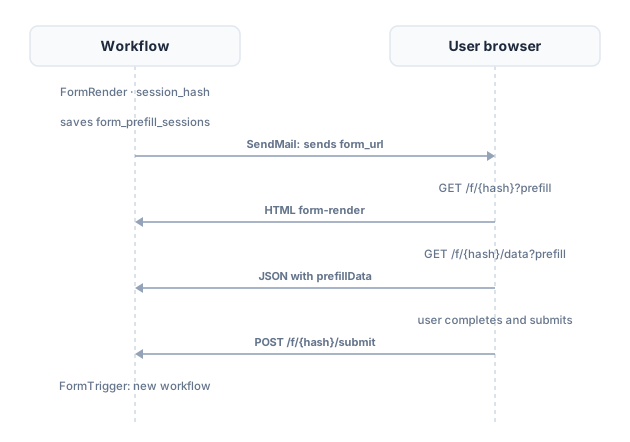
FormRender node configuration
Section titled “FormRender node configuration”| Parameter | Type | Description |
|---|---|---|
form_id | text | Internal form ID (not the public hash) |
field_mapping | json | Field-to-value (or dynamic expression) dictionary |
output_type | select | url (default), html, redirect |
redirect_after_submit | boolean | Whether to redirect the user after they submit the form |
custom_title | text | Title to display (overrides the base form’s, supports variables) |
custom_description | textarea | Custom description (supports variables) |
Output modes
Section titled “Output modes”url (default): the node returns an object with the URL and metadata. The next workflow node receives:
{ "success": true, "form_url": "https://app.floogos.com/f/a1b2c3d4...?prefill=9f8e7d6c...", "session_hash": "9f8e7d6c...", "form_id": 42, "form_name": "Vacation request", "prefill_data": { "name": "Anna", "email": "anna@company.com" }, "expires_at": "2026-04-11T11:30:00.000Z"}Useful when the next step is to send the link via email, Slack, WhatsApp, etc.
redirect: the workflow halts and returns an HTTP 302 Location: {form_url} response. The user’s browser jumps to the form automatically. It only makes sense if the workflow was invoked from the browser itself (e.g., from an “Edit profile” button calling a public webhook).
html: the workflow halts and returns a complete HTML with the embedded form. Useful for environments where you don’t want the user to navigate (some email clients support it, others don’t).
Practical cases
Section titled “Practical cases”Case 1 — Prefilling a form with CRM data
Section titled “Case 1 — Prefilling a form with CRM data”Setup:
Webhook (receives a CRM trigger with a customer_id) -> HTTP Request (queries /api/clients/:id in the CRM) -> FormRender form_id: 12 (Form "Update customer data") field_mapping: { "first_name": "{{@HTTP_Request.data.first_name}}", "last_name": "{{@HTTP_Request.data.last_name}}", "email": "{{@HTTP_Request.data.email}}", "phone": "{{@HTTP_Request.data.phone}}", "customer_id":"{{@Webhook.customer_id}}" } output_type: url -> SendMail to: "{{@HTTP_Request.data.email}}" subject: "Please review your data" body: "Hi {{@HTTP_Request.data.first_name}}, review your data here: {{@FormRender.form_url}}" -> EndWhat happens:
- The CRM fires the webhook with a
customer_id. - The workflow queries the CRM and gets the full customer data.
- The
FormRendernode processesfield_mapping, replacing each{{@...}}with the real customer value. - A session with a random
session_hashis created (24h TTL) containing{first_name: "John", last_name: "Doe", ...}. - The URL is generated:
https://app.floogos.com/f/abc123...?prefill=def456.... - The email is sent to the customer with that URL.
- The customer opens the link, sees the form already filled with their data, fixes anything if needed and submits.
- Another workflow with
FormTriggerreceives the submitted data and updates the CRM.
Key point: the customer does not need to be authenticated in Floogos. The session_hash acts as a single-use token (with expiration), enough to identify them during that interaction.
Case 2 — Approval link for a manager
Section titled “Case 2 — Approval link for a manager”Setup:
FormTrigger (vacation request form filled by an employee) -> SetVariable (saves request_id, employee_email, dates) -> FormRender form_id: 18 (Form "Approve request") field_mapping: { "request_id": "{{var.request_id}}", "employee": "{{var.employee_email}}", "start_date": "{{var.start_date}}", "end_date": "{{var.end_date}}", "decision": "" } custom_title: "Vacation approval - {{var.employee_email}}" output_type: url -> SendMail to: "manager@company.com" subject: "Approve {{var.employee_email}}'s request" body: "Review and approve here: {{@FormRender.form_url}}" -> EndWhat happens:
- The employee submits their request and it gets stored.
- An approval form is generated prefilled with the exact data of the request (the fields are not editable because the base form marks them as
readonly, exceptdecision). - An email is sent to the manager with the link.
- The manager clicks the link, sees the request data without having to copy or look it up, picks their decision and submits.
- A
FormTriggerreceives the manager’s response and triggers the notification to the employee.
Key point: here field_mapping acts as immutable context: the manager sees exactly what the employee asked for, with no chance to manipulate the source fields (since they come from prefill, not from user input).
Case 3 — Prefilled URL with computed fields
Section titled “Case 3 — Prefilled URL with computed fields”Setup:
Webhook (receives shopping cart items) -> Transformation (sums totals, computes taxes) -> FormRender form_id: 25 (Form "Confirm order") field_mapping: { "items": "{{@Transformation.items_summary}}", "subtotal": "{{@Transformation.subtotal}}", "vat": "{{@Transformation.vat}}", "total": "{{@Transformation.total}}", "currency": "EUR", "estimated_ship": "{{@Transformation.ship_date}}" } output_type: redirect -> EndWhat happens:
- The
FormRendernode withoutput_type: redirectdoes not return a URL to the workflow: it directly emits an HTTP 302 response to the browser that triggered the webhook. - The user is redirected to the
Confirm orderform with all the values already computed (totals, estimated date, summarized items). - No intermediate email, everything happens in a single navigation.
Key point: redirect mode only works if the workflow was triggered from the user’s own browser (because the 302 is delivered as the response to that HTTP request). It does not work for cron-triggered or API-triggered flows.
Dynamic variables in field_mapping
Section titled “Dynamic variables in field_mapping”field_mapping accepts any expression supported by Floogos’s dynamic variables engine:
| Syntax | Meaning |
|---|---|
{{@NodeName.path.subpath}} | Value from a previous workflow node |
{{@Webhook.body.email}} | Field from the webhook payload |
{{var.variable_name}} | Variable defined with SetVariable |
{{$now}} | System function (current date) |
literal value | Strings, numbers, booleans directly |
{ "json": "nested" } | Whole objects that are serialized and processed recursively |
Expressions can be mixed:
{ "subject": "Order {{var.order_number}} for {{@HTTP_Request.data.customer}}", "items_count": "{{@HTTP_Request.data.items.length}}"}If a variable does not exist in the workflow context, it is replaced with an empty string (it does not fail). This makes the form load even when some data is optional.
Best practices
Section titled “Best practices”- Do not expose the
public_hashin logs or short public URLs. Even though it expires when unpublished, it still is a token granting access to the form with no additional authentication. - Schedule the link delivery as soon as you generate the
session_hash. If you store it for later sending, remember the 24h expiration. - For sessions that need to live longer than 24h, do not use prefill: use the base form without parameters and store the prior data in
DataStoreorMemory, retrieving it in theFormTriggerwhen the user submits. - Do not put sensitive data in
field_mappingthat you don’t want the user to see or edit. If a field is marked editable in the base form, the user can change it before submitting. If they should not be able to, mark it asreadonlyorhiddenin the form editor. - Use
custom_titleandcustom_descriptionto personalize the form per session. For example:Vacation approval - {{var.employee}}makes it clear who the request belongs to without needing extra fields.
Tables involved
Section titled “Tables involved”| Table | Role |
|---|---|
forms | Form definition, includes public_hash, is_public, status, form_json (field structure) |
form_prefill_sessions | Temporary prefill sessions (24h), one per FormRender execution |
form_submissions | Responses submitted by users |
Relevant public endpoints
Section titled “Relevant public endpoints”| Method | Route | Description |
|---|---|---|
| GET | /f/:hash | Serves the static HTML page of the public form |
| GET | /f/:hash/data?prefill={session} | Returns JSON with the form definition + (optional) prefilled data |
| POST | /f/:hash/submit | Receives the user response and triggers the corresponding FormTrigger |
These endpoints do not require authentication (unless the form has requires_auth = true, in which case the OTP or password flow configured in settings.auth_config is applied).
Troubleshooting
Section titled “Troubleshooting”| Symptom | Likely cause | Fix |
|---|---|---|
Form opens empty even though ?prefill=... is passed | The session expired (more than 24h) | Run the workflow again to regenerate the session_hash |
| Form opens empty as soon as it is generated | The form_id of the FormRender node does not match the form pointed to by public_hash | Verify the configured form_id exists and is published |
| ”Form not found” on a freshly generated URL | The form is in draft or is_public = FALSE | Change the status to published and mark as public |
{{@...}} variables appear literal in the form | The node you depend on did not run before, or the path is wrong | Check the order of the nodes and review the workflow logs |
| An old URL stops working from one day to another | You republished the form and the public_hash was regenerated | Regenerate and resend the links; or toggle the flag without touching the hash |
See also
Section titled “See also”- Forms - Data capture — overview of the
FormTriggerandFormRendernodes - Dynamic variables — full syntax of the expressions you can use in
field_mapping - Triggers — comparison between webhook, cron and form trigger