
Good Practices
This guide compiles the best practices for designing, implementing, and maintaining workflows in an efficient, secure, and scalable way.
1. Workflow design
Section titled “1. Workflow design”Name nodes descriptively
Section titled “Name nodes descriptively”The label of each node is used in dynamic variables with the @ syntax. A node named “Get Customer” allows referencing its data as {{@Get Customer.email}}, which is much more readable than {{#3.email}}.
Bad example:
- Node 1: “HTTP”
- Node 2: “Decision”
- Node 3: “HTTP”
Good example:
- Node 1: “Get Order”
- Node 2: “Validate Available Stock”
- Node 3: “Update Inventory”
Keep workflows small and focused
Section titled “Keep workflows small and focused”Apply the single responsibility principle: each workflow should do one thing and do it well. A workflow that manages orders should not also handle invoicing and sending marketing emails.
Use subWorkflow to split complex workflows
Section titled “Use subWorkflow to split complex workflows”When a business process requires many steps, split it into several workflows connected through the subWorkflow node. This allows:
- Reusing common parts across different processes.
- Testing each part independently.
- Reducing the visual complexity of the editor.
- Facilitating teamwork.
Document the workflow’s purpose
Section titled “Document the workflow’s purpose”Each workflow has a description field. Use it to explain:
- What the workflow does and why it exists.
- What system or business process it supports.
- What triggers activate it.
- Any external dependencies or prerequisites.
2. Data handling
Section titled “2. Data handling”Use dynamic variables with node references
Section titled “Use dynamic variables with node references”Prefer {{@NodeName.field}} instead of {{field}}. The @ syntax explicitly indicates which node the data comes from.
# Recommended{{@Get Customer.email}}{{@Search Order.total}}
# Not recommended{{email}}{{total}}
Use memory variables for shared data
Section titled “Use memory variables for shared data”The setVariable and getVariable nodes allow storing data in memory during workflow execution. They are useful for:
- Storing an authentication token obtained at the start for use in multiple HTTP calls.
- Keeping a counter or accumulator that is updated in an iterator.
- Sharing configuration between parallel branches.
Validate input data before processing
Section titled “Validate input data before processing”Before operating with external data (webhooks, APIs, forms), validate it with a Decision or Validate node. Check that:
- Required fields exist and are not empty.
- Data types are correct (numbers, dates, emails).
- Values are within expected ranges.
Use DataStore to persist data between executions
Section titled “Use DataStore to persist data between executions”When data needs to survive between different workflow executions, use DataStore. Memory variables only exist during a single execution; DataStore persists data permanently.
3. Error handling
Section titled “3. Error handling”Always consider the “false” branch in decisions
Section titled “Always consider the “false” branch in decisions”Each Decision node has two outputs: true and false. Never leave the false branch unconnected. A Decision node without a connected false branch causes the execution to stop silently.
Use continueOnError for non-critical nodes
Section titled “Use continueOnError for non-critical nodes”Some nodes can fail without invalidating the entire flow. For example, a node that sends a Slack notification should not stop order processing if Slack is temporarily down.
Reserve this option for truly non-critical nodes. Never enable it on nodes whose result is needed for subsequent steps.
Implement error notifications
Section titled “Implement error notifications”Use notification nodes (SendMail, Slack, Telegram) to alert the team when critical errors occur. Include:
- Name of the workflow and node that failed.
- Error message.
- Relevant data to diagnose the problem.
- Execution timestamp.
Monitor traces
Section titled “Monitor traces”Periodically review the traces table to:
- Detect workflows that fail recurrently.
- Identify performance bottlenecks.
- Verify that scheduled workflows execute as expected.
- Audit the processing of sensitive data.
4. Performance
Section titled “4. Performance”Limit concurrency in iterators
Section titled “Limit concurrency in iterators”When using the Iterator node with the maxConcurrent option, control how many iterations run in parallel. A value between 3 and 10 is usually adequate for most external APIs.
Use bulk operations with DataStore
Section titled “Use bulk operations with DataStore”When you need to save or update many records, use DataStore’s bulk operations instead of saving record by record inside an iterator. Bulk operations are significantly faster for large volumes.
Avoid infinite loops
Section titled “Avoid infinite loops”When implementing loops, always ensure there is a clear exit condition and a maximum iteration limit as a safeguard.
Use delay for rate limiting
Section titled “Use delay for rate limiting”When a workflow calls external APIs with request limits, insert Delay nodes between calls to respect those limits.
5. Security
Section titled “5. Security”Never put credentials directly in the configuration
Section titled “Never put credentials directly in the configuration”Always use the platform’s credential system, which:
- Stores credentials in encrypted form.
- Allows reusing them across multiple nodes and workflows.
- Facilitates rotation without modifying workflows.
- Prevents credentials from appearing in traces or logs.
Validate webhook data
Section titled “Validate webhook data”Webhooks are public entry points. Before processing received data:
- Verify the origin’s authenticity (tokens, signatures, headers).
- Validate the structure and content of the data.
- Sanitize data to prevent injections.
- Reject requests that do not comply with the expected format.
Separate development and production environments
Section titled “Separate development and production environments”Use the development webhook for testing and the production one for real traffic. Never test with production data without anonymizing it.
Limit credential permissions
Section titled “Limit credential permissions”Apply the principle of least privilege: credentials should have only the permissions necessary for the task they perform.
6. Webhooks
Section titled “6. Webhooks”Respond quickly
Section titled “Respond quickly”If the workflow needs to perform long operations, use the Web Response node as soon as possible to confirm receipt:
Webhook -> Web Response (202 Accepted) -> [long processing] -> EndValidate the request origin
Section titled “Validate the request origin”- Verify tokens or secret keys in headers.
- Validate HMAC signatures when the sending system provides them.
- Reject requests with error
Web Response(400, 401, 403).
Filter unwanted events
Section titled “Filter unwanted events”Use a Decision node immediately after the webhook to filter and process only relevant events.
Implement idempotency
Section titled “Implement idempotency”Sending systems may resend the same event. The workflow should detect and handle duplicates:
- Store already processed event IDs in DataStore.
- Before processing, check if the event was already handled.
- If already processed, respond with success without repeating the operation.
7. Schedule
Section titled “7. Schedule”Choose reasonable intervals
Section titled “Choose reasonable intervals”Don’t schedule a workflow to run every minute if the task doesn’t require it. Evaluate the actual need.
Consider server time zones
Section titled “Consider server time zones”Schedules run according to the time zone configured on the server. Document the expected time zone in the workflow description.
Verify that the previous execution finished
Section titled “Verify that the previous execution finished”Use a record in DataStore that indicates whether the workflow is running. At the start, check if the previous execution has finished.
Use logs to audit scheduled executions
Section titled “Use logs to audit scheduled executions”Scheduled workflows run without human intervention. Implement audit logging with start, end, record count, and errors.
8. Dynamic variables
Section titled “8. Dynamic variables”Use {{@NodeName.field}} to reference specific nodes
Section titled “Use {{@NodeName.field}} to reference specific nodes”{{@Get Customer.name}} -> Clear: the name comes from the "Get Customer" node{{@Calculate Price.total}} -> Clear: the total comes from the "Calculate Price" nodeIf nodes are rearranged, name-based references still work.
Use {{var.name}} for data shared between workflows
Section titled “Use {{var.name}} for data shared between workflows”They allow passing configuration, parameters, or results between execution levels without needing to map each field individually.
Use {{#1.field}} only when relative position is relevant
Section titled “Use {{#1.field}} only when relative position is relevant”Useful inside iterators where you always want to reference the immediately previous node. In most cases, name-based reference is preferable.
Test variables in development mode
Section titled “Test variables in development mode”Verify that all dynamic variables resolve correctly before activating in production.
9. DataStore
Section titled “9. DataStore”Design logical groups
Section titled “Design logical groups”Organize data using groups that reflect the business structure:
customers- customer and contact data.orders- orders and their statuses.configuration- system parameters and options.cache- temporary data from external APIs.
Use meaningful keys
Section titled “Use meaningful keys”Keys should be identifiers with business meaning: email for customers, order_id for orders, sku for products.
Leverage tags to categorize and filter
Section titled “Leverage tags to categorize and filter”Tags allow adding metadata to facilitate searches: mark processing status, categorize records, group by batch or execution.
Use DataStore Trigger to react to changes in real time
Section titled “Use DataStore Trigger to react to changes in real time”It is more efficient than a scheduled workflow that periodically checks for changes.
Clean up obsolete data periodically
Section titled “Clean up obsolete data periodically”Create a scheduled workflow that deletes old records, archives historical data, and cleans up expired cache records.
10. Common workflow patterns
Section titled “10. Common workflow patterns”a. Webhook -> Process -> Respond
Section titled “a. Webhook -> Process -> Respond”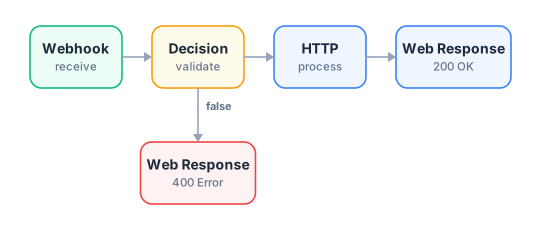
When to use it: When an external system needs to send data and wait for a synchronous response.
b. ETL (Extract-Transform-Load)
Section titled “b. ETL (Extract-Transform-Load)”
When to use it: For periodic synchronizations, imports, migrations, aggregated reports.
c. Fan-out / Fan-in (Iterator + Merge)
Section titled “c. Fan-out / Fan-in (Iterator + Merge)”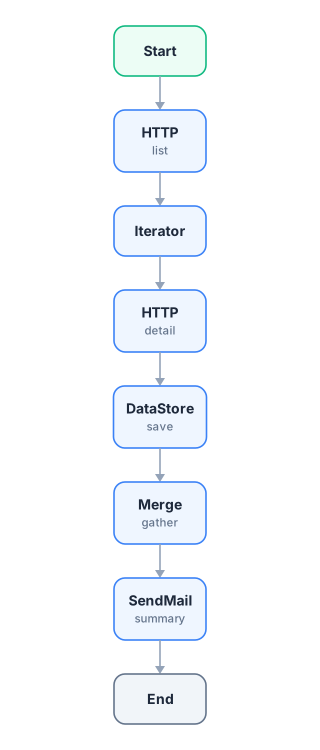
When to use it: For processing lists where each element requires an individual operation.
d. Human approval
Section titled “d. Human approval”
When to use it: For expense approval processes, vacation requests, publication approvals.
e. Bidirectional synchronization
Section titled “e. Bidirectional synchronization”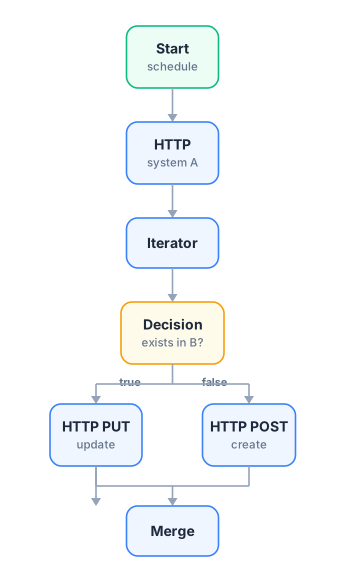
When to use it: To keep two systems synchronized (CRM and ERP, online store and warehouse).
f. Multi-channel notification
Section titled “f. Multi-channel notification”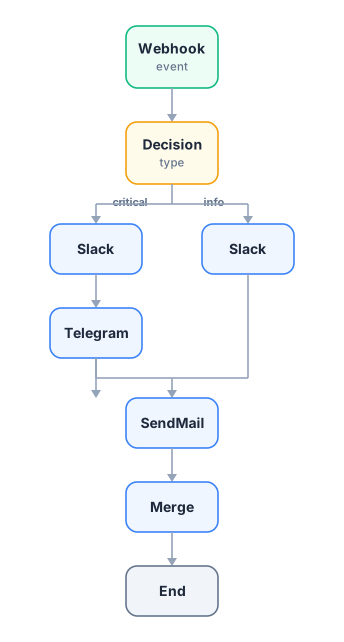
When to use it: For alert systems where urgency determines the channels used.
Summary
Section titled “Summary”- Clarity: Name nodes well, document workflows, use variables with explicit references.
- Robustness: Validate input data, handle the false branch, implement error notifications.
- Efficiency: Control concurrency, use bulk operations, choose reasonable schedule intervals.
- Security: Use the credential system, validate webhooks, apply least privilege.
- Maintainability: Split complex workflows, clean up obsolete data, monitor traces.