
Multi-country invoicing from an ERP
If your company operates in several countries, you don’t need a separate invoicing system for each. With the Fiscal Hub you build one workflow that receives the request from your ERP and issues in the country that applies.
Scenario
Section titled “Scenario”Your ERP (or a central table/dataset) generates invoicing orders with a country field. You want to issue the document at the right authority based on that field and return the fiscal identifier to the ERP.
How the workflow looks
Section titled “How the workflow looks”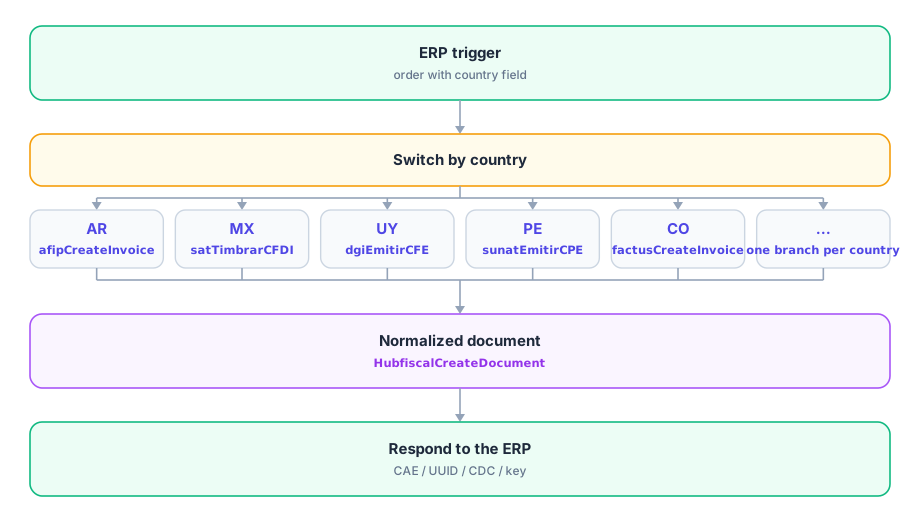
Key points
Section titled “Key points”- The Switch node routes on the
countryfield; each branch uses that country’s issuer node. Normalizing afterwards with HubfiscalCreateDocument gives you a common document model regardless of origin. - Each country needs its own credential (provider
afip,sat,dgi,sunat,factus, …). Set them up once and reuse them. - Always return the country’s fiscal identifier to the ERP: it is the key to reconcile later.
- Add new countries by adding a branch to the switch, without rebuilding the workflow.
Related nodes
Section titled “Related nodes”- Switch / Decision — branch by country.
- HubfiscalCreateDocument — consolidate normalized.
- HubfiscalGetDocuments — query what was issued per country.