
Invoice automatically from an e-commerce
One of the most common uses of the Fiscal Hub is to turn every online sale into a valid tax document, automatically. Instead of someone invoicing by hand at the end of the day, the workflow does it the moment the order is paid.
Scenario
Section titled “Scenario”You have a store (Shopify, WooCommerce, Prestashop, Magento, etc.). When an order is paid, you want to:
- Issue the country’s tax document (invoice, receipt or CFE as applicable).
- Store the normalized document in the Fiscal Hub.
- Send the customer the PDF with its verification QR code.
How the workflow looks
Section titled “How the workflow looks”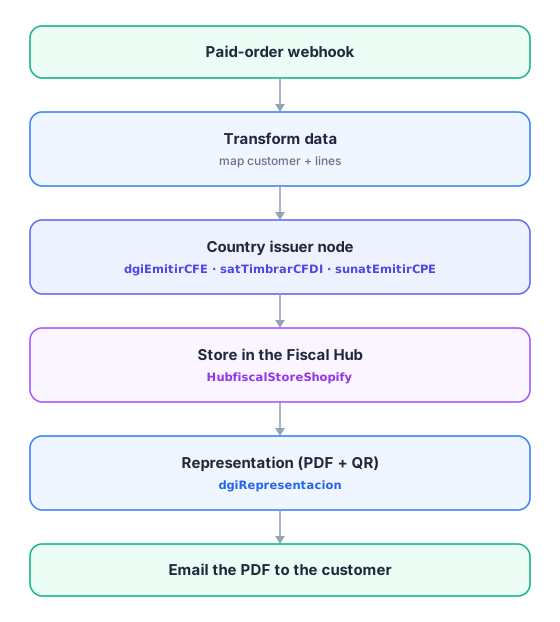
Key points
Section titled “Key points”- The issuer node is the only thing that changes per country. The workflow shape is always the same: issue → store → represent → notify.
- Save the identifier returned by the authority (CAE, UUID/fiscal folio, CDC, access key, TrackId…) in your database or the Hub: it is the proof the document is valid.
- Always validate in the test/homologation environment before going to production — every fiscal credential distinguishes the environment.
- If the authority rejects the document, the node returns the error: chain an Error Trigger or a notification so you never leave a sale uninvoiced.
Related nodes
Section titled “Related nodes”- Your country’s page in the Countries section with the specific issuer node.
- HubfiscalCreateDocument — register the document in the Hub.
- HubfiscalExportPdf — export the ticket as PDF.