
On-demand invoice from a form
With Floogos you can publish a form so the customer themselves requests their document (self-invoicing). The workflow behind it issues at the authority and returns the document right away.
Scenario
Section titled “Scenario”After a purchase, the customer fills in a form with their tax details (ID, legal name) to receive their invoice. You want to issue it and show them the PDF with the QR without anyone on the team intervening.
How the workflow looks
Section titled “How the workflow looks”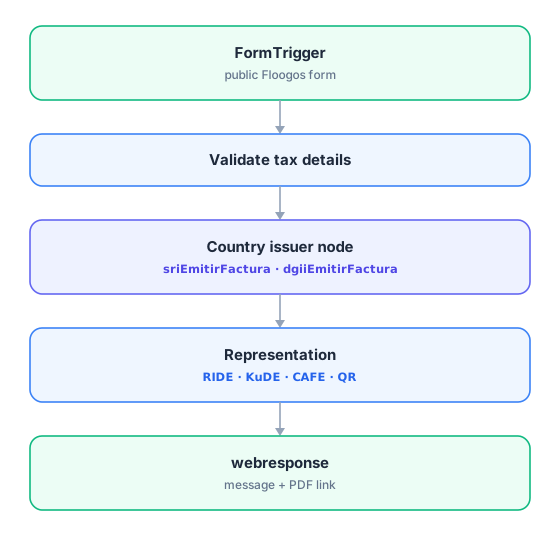
Key points
Section titled “Key points”- The first node must be FormTrigger (not
startorWebhook): it is the node the Floogos form triggers. - End the workflow in a webresponse node so the form shows the customer the result (document number and PDF link), not an
end. - Validate the tax ID before issuing: a wrong value is a rejection from the authority.
- Each country has its printable representation: RIDE (Ecuador), KuDE (Paraguay), CAFE (Panama), or the HTML/PDF with QR for the rest.
Related nodes
Section titled “Related nodes”- Forms — how to publish a Floogos form.
- Your country’s page in Countries.
- HubfiscalExportPdf — generate the document PDF.